Mercado Libre Product Photo Requirements: Size & Tips
Your photos are the first thing a buyer judges on Mercado Libre, long before they read your title or compare your price. A blurry picture on a messy table can sink a great product, while a clean, bright shot builds trust in seconds. Knowing the Mercado Libre product photo requirements helps you avoid rejected images, lost visibility and unnecessary questions from buyers. This guide covers the size, format and background you need, plus practical tips to shoot and edit your photos with just your phone.
Note: Mercado Libre updates its guidelines from time to time, and details can vary by country and category (fashion, electronics and home don't always follow identical rules). Use the numbers below as a solid working guide, and always check the current help section in your seller account before publishing.
Mercado Libre product photo requirements at a glance
Here is the short version of what sellers are usually asked to follow:
| Element | What to aim for | |---|---| | Main photo background | Plain white, with no scenery | | Minimum size | At least 500 px on the longest side | | Recommended size | 1200 × 1200 px or larger (square), so buyers can zoom | | Format | JPG or PNG | | File weight | Keep it light; the platform sets a maximum per image (around 10 MB is commonly cited) | | Content | The real product, centered and fully visible | | Not allowed on the main image | Watermarks, logos overlaid on the photo, promotional text, borders, collages |
Let's look at each point in detail.
Size and resolution
The common minimum is 500 px on one side, but treat that as the floor, not the goal. If your photo is small, the zoom feature won't work well and the image will look soft on large screens and Retina phones.
- Aim for 1200 × 1200 px or more. A square canvas is the safest choice because Mercado Libre displays thumbnails in a square frame.
- Don't upscale a tiny photo by stretching it. It will look pixelated. Reshoot at higher resolution or enhance it properly.
- Keep the original quality. Avoid sending images through chat apps before uploading, since they compress the file and lose detail.
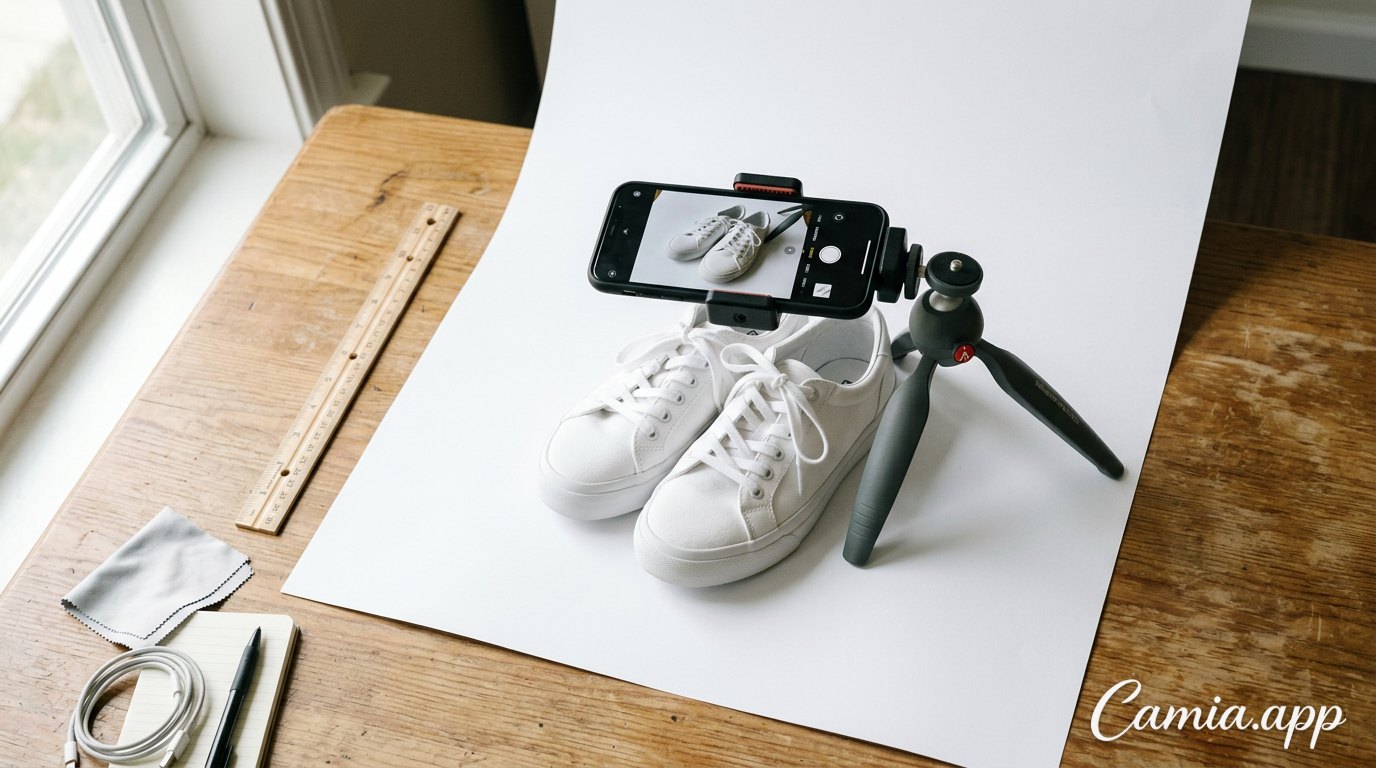
 Vendedor fotografiando un producto sobre fondo blanco con su celular
Format and file weight
JPG is the best all-round option: it's light and works everywhere. PNG is useful when you've removed the background and want to keep sharp edges, but PNG files are heavier. If your photo is too heavy, export it as JPG at high quality instead of shrinking the dimensions too much.
Background and what's not allowed
The cover photo is the one that shows in search results, next to dozens of competitors. That's why Mercado Libre asks for a clean presentation, typically a pure white background, for the main image. A few rules of thumb:
- Use a plain white background with no props, hands, mannequins or furniture visible (check your category, as fashion sometimes allows models).
- No watermarks, store logos, phone numbers, prices or promotional text pasted over the image.
- No borders, frames or collages on the cover photo.
- Show only what you're selling. If the listing is for a phone, don't include the headphones from another listing unless they come in the box.
- The product should fill most of the frame, with a small, even margin around it.
Additional photos are usually more flexible. That's where you can show the product in use, in context, with lifestyle scenes or close-ups of details, as long as they remain honest and relevant.
How many photos should you upload and which ones?
More photos mean fewer doubts, and fewer doubts mean fewer abandoned purchases. Mercado Libre allows several images per listing (the exact limit can change by category), so use as many as are genuinely useful. A strong set looks like this:
- Main photo: front view on white, sharp and well lit.
- Back and side views: so nothing is hidden.
- Close-up of details: textures, stitching, ports, buttons, labels.
- Scale photo: the product next to a hand or a common object so people grasp the real size.
- In-use photo: the product working, worn or placed in a room.
- Packaging and what's included: accessories, manual, box.
If you sell variations (colors, sizes), show each one clearly. Buyers who can't see the exact color often end up asking questions or, worse, returning the item.
How to take good Mercado Libre listing photos with your phone
You don't need a studio. A recent phone and a bit of method are enough.
Step-by-step shooting guide
- Clean the lens and the product. Fingerprints on the lens are the most common cause of hazy photos.
- Find soft light. Place the product next to a large window in daytime. Avoid direct sun, which creates harsh shadows and glare.
- Use a white surface. A sheet of white poster board curved up behind the product creates a seamless backdrop.
- Stabilize the phone. Use a tripod or lean it on a stack of books so every shot has the same angle.
- Shoot at the highest resolution and keep the camera parallel to the product to avoid distortion.
- Leave breathing room around the product so you can crop to a square without cutting anything off.
- Take extra shots: more angles than you think you need.
Quick tips for tricky products
- Shiny items (glass, metal, jewelry): use diffused light and angle the product so reflections don't show your phone or room.
- White products on a white background: add a soft natural shadow underneath so the edges stay visible.
- Clothing: iron or steam it first, and use a hanger or flat-lay on a clean surface.
- Small items: use your phone's macro mode or step back and crop slightly instead of getting too close and losing focus.
Edit your photos to meet the rules with CamIA
Even a good shot usually needs a final touch: a cleaner background, better light or a square crop. CamIA is a free AI photo editor that runs in your browser (on phone or computer, with nothing to download) and also as an Android and iOS app. Here's a simple workflow for a Mercado Libre listing:
- Open your photo in CamIA and use the background remover, or the white background option, to get a clean product cutout on white.
- Erase distractions. If a cable, a stain or a bit of clutter remains, brush over it with the AI object remover.
- Enhance the photo for sharper detail and better lighting. Subtle improvements work best, since the product has to look like what the buyer will receive.
- Crop to a square with the free crop tool so the product sits centered with even margins.
- Fine-tune brightness, contrast and color in the manual editor if the color looks off.
- Export as JPG or PNG up to the original resolution and upload it straight to your listing.
If you want extra photos with a more attractive look for the secondary slots, the AI Product Studio can create professional product shots with new backgrounds and scenes, and it can split several products into separate photos. Keep the cover image clean and use these scenes for the gallery. CamIA includes free monthly points, and guests get a few free AI tries, so you can test it on one product before committing.
Common mistakes that hurt your listings
- Using photos from other sellers or the manufacturer without permission. They may be flagged, and buyers prefer seeing the real item.
- Over-editing. If colors, textures or size look different in person, you'll get complaints and returns.
- Dark or yellowish light from indoor bulbs. It makes products look cheap.
- Tilted or cut-off products in the cover image.
- Text and badges like "Best price!" or "Free shipping" on the main photo.
- Inconsistent style. If your store has many listings, keep the same background, lighting and angle for a professional, trustworthy look.
- Skipping the mobile preview. Most buyers browse on their phones, so check how the thumbnail looks at small size.
FAQ
What size should Mercado Libre photos be?
The commonly stated minimum is 500 px on the longest side, but the best practice is a square image of 1200 × 1200 px or larger. That size looks sharp and enables zoom. Confirm the current specs for your country and category in your seller account.
Does Mercado Libre require a white background?
For the main photo, a plain white background is the standard recommendation and is required in many categories. Secondary photos are generally more flexible and can show the product in context. Because rules vary by category, check the guidelines for the one you're listing in.
Can I put my logo or watermark on the photos?
It's best not to. Overlaid logos, watermarks and promotional text are typically not accepted on the main image, and they can lower the quality of your listing. Keep the cover photo clean and communicate offers in the title and description instead.
Can I take Mercado Libre photos with my phone?
Yes. A modern phone camera is enough if you use natural window light, a white backdrop, a steady position and the highest resolution. Then clean up the background and crop with an editor.
How do I remove the background from a product photo for free?
Use an AI background remover. In CamIA you can upload your photo, remove the background or switch to white, and export it as JPG or PNG without installing anything, using the free monthly points.
Conclusion
Meeting the Mercado Libre product photo requirements comes down to a few habits: a sharp, square image of at least 1200 px, a clean white background on the cover, honest additional photos, and no text, logos or borders on the main shot. Good light and a steady phone do most of the work, and editing finishes the job.
Ready to polish your listings? Try CamIA for free, remove the background, clean up your product photo and export it ready for Mercado Libre in minutes.